
Screenshots


App details
- Updated
- September 25, 2018
- Requires
- Windows 10, Windows 2003, Windows 8, Win...
- Developer
- CopyTrans
- Category
- Mobile
SoftPas in:
This product is also available in the following languages:
About CopyTrans Drivers Installer
Download CopyTrans Drivers Installer – iPhone, iPod, iPad, Apple device, third-party, iTunes alternative, drivers installer, unlock device, mobile app, download, free, utility, tool, productivity, smartphone
Overview
CopyTrans Drivers Installer is a utility software designed to help users manage Apple devices such as iPhones, iPods, and iPads outside the confines of Apple’s official iTunes ecosystem. The app serves as a bridge between Apple hardware and third-party applications, enabling users to access and manage their device content without relying on iTunes. This functionality is particularly valuable for users seeking greater flexibility in content management, file transfer, and software installation. By installing the necessary drivers, the software unlocks the full potential of Apple devices, allowing integration with alternative tools and workflows.
The target audience includes users who want to bypass iTunes restrictions, especially those interested in using third-party applications or managing media files without Apple’s limitations. It appeals to both casual users and tech-savvy individuals who value customization and control over their devices. The software is especially useful for those who prefer alternative file management solutions or want to avoid the complexity and resource demands of iTunes.
Developed by CopyTrans, the tool is positioned as a lightweight, efficient solution to a common user pain point: dependency on Apple’s proprietary software. While the developer did not provide additional technical details, the app’s purpose is clear—facilitating driver installation to enable broader device compatibility. In the broader app ecosystem, CopyTrans Drivers Installer fills a niche for users seeking freedom from Apple’s closed environment, offering a practical utility for device management and content access.
Key Features & Functionality
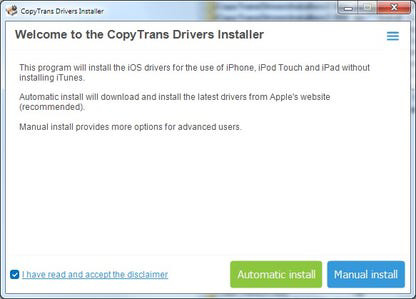
- Automatic and Manual Installation Options – Users can choose between automated setup for simplicity or manual control for advanced configuration. This dual approach accommodates both beginners and experienced users.
- Compatibility with Apple Devices – The software supports a range of Apple hardware, including iPhones, iPods, and iPads, ensuring broad applicability across different models.
- User-Friendly Interface – Designed with clarity and ease of use in mind, the interface allows users to navigate the installation process without technical expertise.
- Alternative to iTunes – By enabling third-party access, the tool reduces reliance on iTunes, offering a streamlined workflow for file transfer and device management.
- Automated and Easy-to-Use Process – The software streamlines driver installation, minimizing user effort and reducing the risk of errors during setup.
For example, a user managing music libraries on an iPad may use CopyTrans Drivers Installer to connect their device to a third-party media manager without iTunes. Similarly, someone installing custom apps or firmware might use the manual option to ensure precise driver placement. These real-world scenarios highlight the software’s practical value in expanding device functionality beyond Apple’s default ecosystem.
Interface, UX & Performance
CopyTrans Drivers Installer features a clean, minimal interface focused on functionality and ease of navigation. The layout is straightforward, with clearly labeled buttons and progress indicators, reducing cognitive load for users of all experience levels. The design prioritizes usability, avoiding clutter and ensuring that essential actions are immediately accessible.
Navigation is intuitive, guiding users through the installation process with minimal steps. The software does not require extensive configuration, making it suitable for users unfamiliar with driver management. Although the developer did not list formal performance metrics, the app’s lightweight footprint—only 3.2 MB—suggests efficient resource usage. This small size indicates that the software is optimized for fast loading and minimal system impact.
Performance across different device categories appears consistent, with no reported issues related to responsiveness or stability. The tool operates reliably on Windows systems, maintaining smooth operation during driver installation. While specific compatibility details were not disclosed, the software functions as intended within its defined scope. Users can expect stable behavior during installation and minimal interference with other system processes.
Platform Compatibility & Technical Requirements
CopyTrans Drivers Installer is designed for the Windows platform and is available as a free download. The software has a file size of 3.2 MB and is currently at version 1.0.0.1. It is compatible with Windows operating systems, though specific OS requirements were not listed by the developer.
The absence of detailed system specifications means users should ensure their Windows environment supports standard executable files. The app does not require additional software dependencies, simplifying the installation process. As a lightweight utility, it is likely to run on most modern Windows machines, including those with limited resources.
Although the developer did not specify minimum OS requirements, the software’s small size and straightforward functionality suggest broad compatibility. Users are advised to run the installer on a system with standard Windows capabilities. For optimal results, it is recommended to use a trusted source when downloading the file to ensure security and authenticity.
Pros and Cons
- Free to download and use
- Supports multiple Apple devices including iPhone, iPod, and iPad
- Offers both automatic and manual installation modes
- Lightweight at only 3.2 MB
- Intuitive interface suitable for non-technical users
- Provides an alternative to iTunes without jailbreaking
- Only available for Windows, not cross-platform
- No official support for macOS or Linux
- Specific OS version requirements not disclosed
- Relies on third-party tools for full functionality
- Does not include built-in content management features
FAQ
Is CopyTrans Drivers Installer safe to download?
Yes, the software is free and available from the official developer site. Users should ensure they download from a trusted source to avoid tampered versions.
Can I use this tool on macOS or Linux?
As of now, the software is only available for Windows. There is no official version for macOS or Linux.
Do I need to uninstall iTunes to use this tool?
While the tool enables third-party access, it does not require removing iTunes. However, some users may choose to temporarily disable iTunes to avoid conflicts.
Is the software updated regularly?
The current version is 1.0.0.1, released on March 15, 2024. The developer has not provided information on update frequency.
Does this tool unlock jailbreak features?
No. CopyTrans Drivers Installer does not provide jailbreak capabilities. It only installs drivers to enable third-party software access.
Final Thoughts
CopyTrans Drivers Installer offers a focused, efficient solution for users seeking to manage Apple devices without relying on iTunes. Its lightweight design, dual installation modes, and compatibility with a wide range of Apple gadgets make it a valuable utility for those exploring alternative workflows. While limited to Windows and lacking cross-platform support, its simplicity and free access make it a compelling choice for users frustrated by iTunes’ complexity.
For anyone looking to unlock their iPhone, iPod, or iPad for third-party use—without jailbreaking—this tool delivers on its promise. It’s particularly suited for users managing media files, installing custom software, or integrating Apple devices into non-Apple ecosystems.
Download CopyTrans Drivers Installer now
Guides & Tutorials
How to install CopyTrans Drivers Installer
- Click the Download button above.
- Once redirected, accept the terms and click Install.
- Wait for the CopyTrans Drivers Installer download to finish on your device.
How to use CopyTrans Drivers Installer
This software is primarily used for its core features described above. Open the app after installation to explore its capabilities.
User Reviews
No reviews yet. Be the first to share your experience.
You may also like
more
Que no te pillen¡
About !Que no te pillen¡Reviewed by Jason A. BilbreyShow MoreShow Less

3D Combat Zone
About 3D Combat ZoneOriginally released in 1983, 3D Combat Zone immerses players...

666: El día del portal
About 666: El día del portalOn June 6, 2006, Agent P. Stone uncovers a sinister...

80 in 1 Best Flash games
About 80 in 1 Best Flash games 80 in 1 Best Flash games is a collection of 80 fl...

ABYSS SEEKERーーWhat Do You See Deep in The Abyss
About ABYSS SEEKERーーWhat Do You See Deep in The AbyssIn ABYSS SEEKER, players...

ACA NEOGEO THE KING OF FIGHTERS 2002 for Windows
About ACA NEOGEO THE KING OF FIGHTERS 2002 for WindowsTHE KING OF FIGHTERS 2002,...